
Your website, and the dashboard behind it
Bidders find your sales, register with you, bid and pay on a website in your own name. Your staff catalogue, run the sale and settle it from one dashboard. Here is what each one does.

Your website
What your bidders can do
Your website is where bidders find your sales, register with you, bid, and pay you. It carries your name, your look and your address, and Auctionomy stays out of sight.

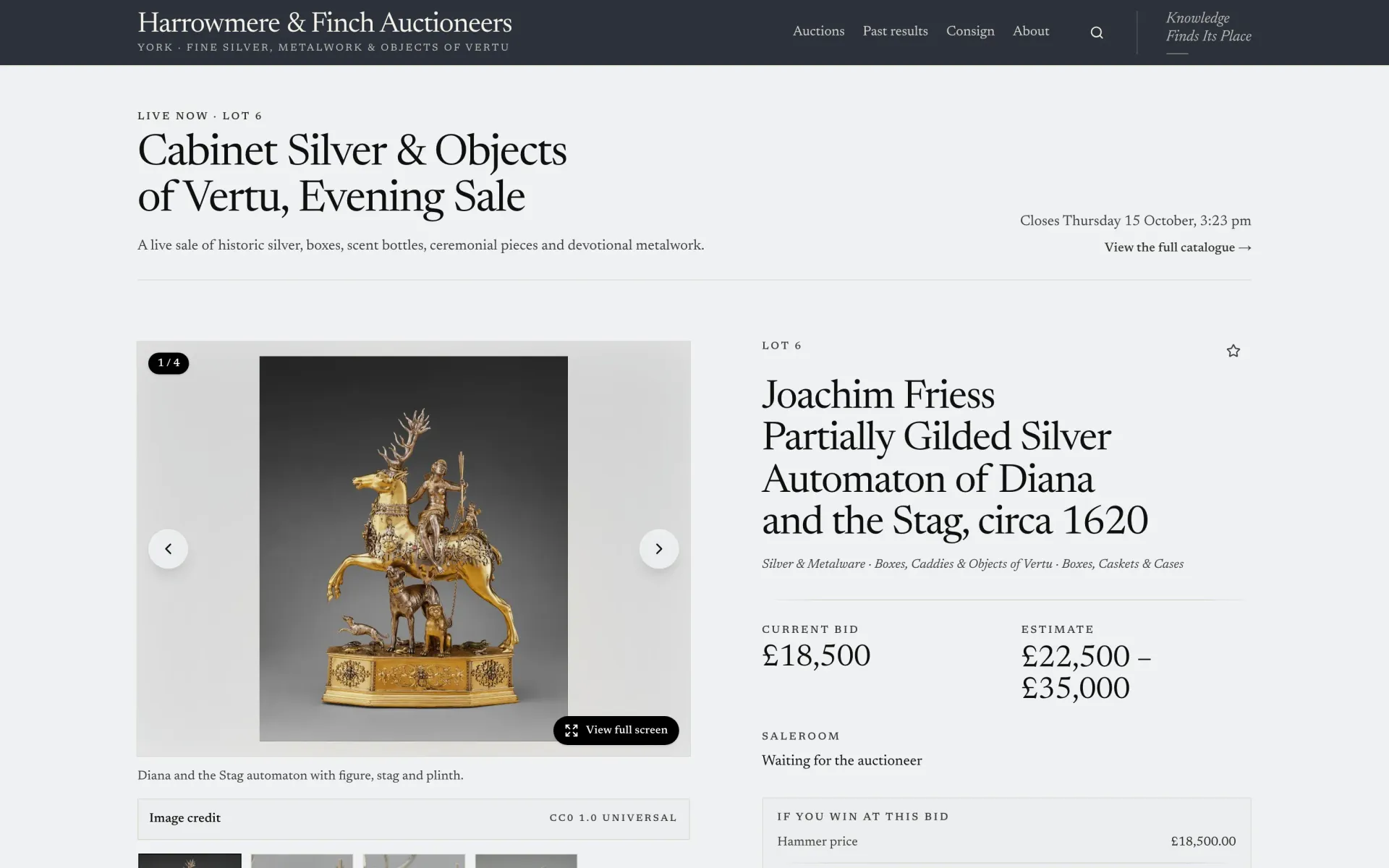
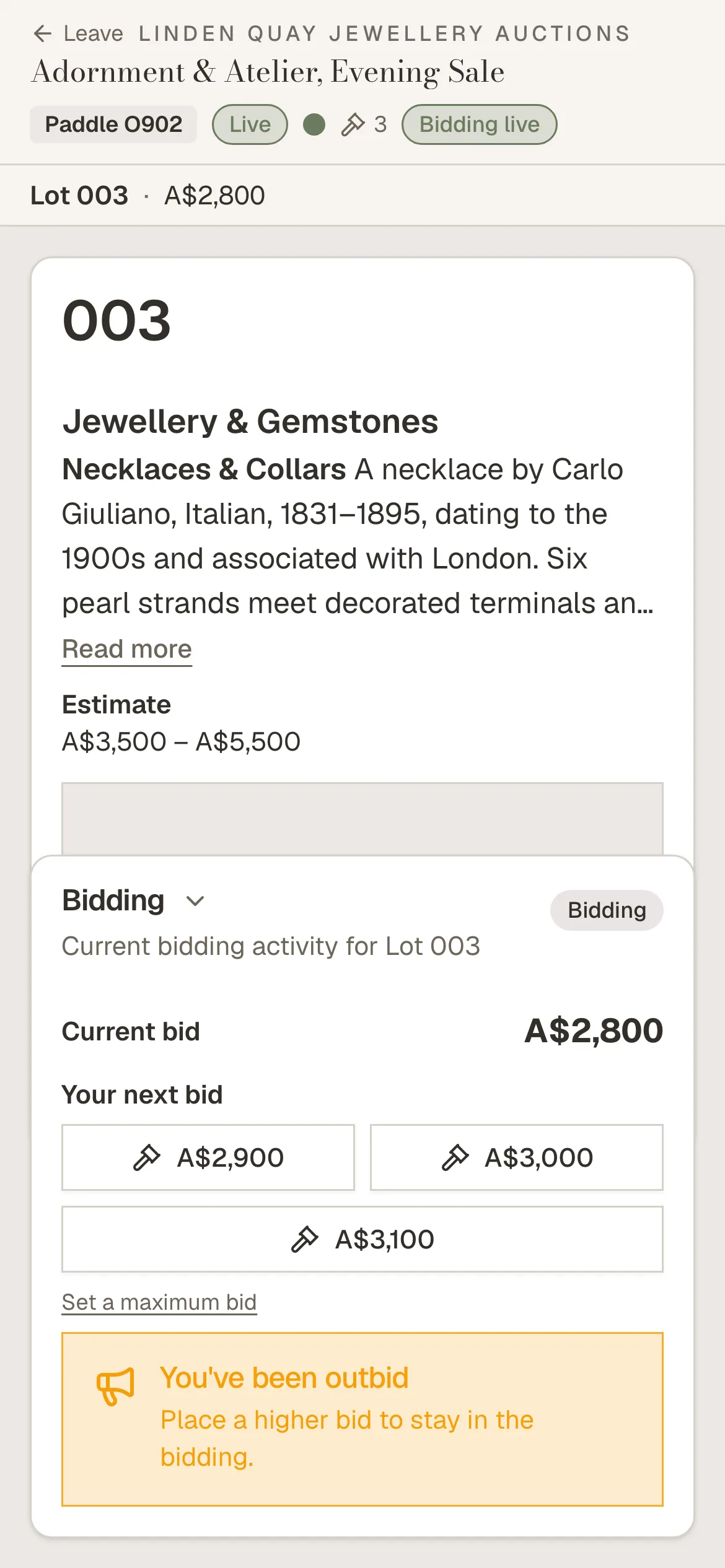
A lot page at Harrowmere & Finch Auctioneers, and a live sale at Linden Quay Jewellery Auctions on a bidder's phone. Demonstration houses.
Finding lots
Your sales, laid out the way a bidder looks for them.
Your sale calendar
Upcoming sales on their own page, and every past sale kept in an archive with what each lot made.
Search
A search box in the header finds lots and sales. Searching within a sale covers every lot, by number, title or description.
Browse the catalogue
Filter by category and subcategory, or show only watched lots. Switch between a gallery and a list that sorts by lot number, estimate or current bid.
Viewing times
Each sale shows when and where its lots can be seen in person.
Lot pages
The whole entry, as you wrote it, with everything a bidder needs before bidding.
Every photograph
A gallery with thumbnails, a full-screen view and zoom, so a bidder can look closely.
The full entry
Estimate, condition, provenance and your own details, and the lot's specialist when you choose to show them.
What a win costs
Your buyer's premium and tax on every lot, with what the current bid would come to in total.
On through the sale
Previous and next lot, and related lots from the same sale.
Accounts and registration
Bidders open an account with your house, and register with you for each sale.
An account with your house
Bidders create an account from a link sent by email, sign in with a password or a link, and reset a forgotten password.
Registration for each sale
A bidder registers for a sale and sees where they stand: waiting, approved, or declined with the reason you gave.
Their own data
Bidders can download what you hold about them, or close their account.
Bidding
Timed, live and Dutch sales, on a phone or a computer.
Timed sales
Bid, or leave an absentee bid up to a maximum and let it bid for you. Each lot counts down to its close, and a late bid extends it by the minutes you set.
Live sales from anywhere
Watch and hear the rostrum on live video, or audio alone, and bid against the room as the auctioneer calls the lot.
Dutch sales
The price steps down to the floor you set, and the first bidder to take it buys the lot.
Told when outbid
An email when someone bids higher, unless the bidder is already watching the lot online.
A bidder's account
Everything a bidder has with your house, in one place.
Watchlist
Lots a bidder is following, with an email reminder before a watched lot closes.
My bids and purchases
Every bid across your sales, and every lot they have bought from you.
Invoices, and paying them
Each invoice to view and download as a PDF, with your bank details on it, and card payment once you connect your Stripe account.
Messages with your house
Your messages in their account, and a reply that comes straight back to you.
Notifications
Approvals, outbids, wins and invoices in their account and by email, which each bidder can turn off.
Consigning to you
A request to sell with you, with photographs, condition and provenance, and a list to follow each request.
Your house online
The rest of your site: who you are, how to find you, and how to get in touch.
Your own address
An auctionomy.site address from the first day, or your own domain.
Your pages
About the house, selling with you, your conditions of sale, and any page you add.
A homepage in sections
The sale calendar, a featured sale, recent results, your specialists, how to visit with a map, and a mailing-list signup.
Valuations and enquiries
Forms for a valuation request or a general enquiry, delivered to your team.
Emails in your name
Every email to a bidder carries your house's name and logo, and replies come to you.
Help and cookies, under your name
Help pages for bidders and a cookie notice, in your colours and your house's name.
Your dashboard
What your staff can do
The dashboard is where your team catalogues, runs the sale from the rostrum, settles with buyers and keeps the website up to date. Everyone sees the same sale as it happens.

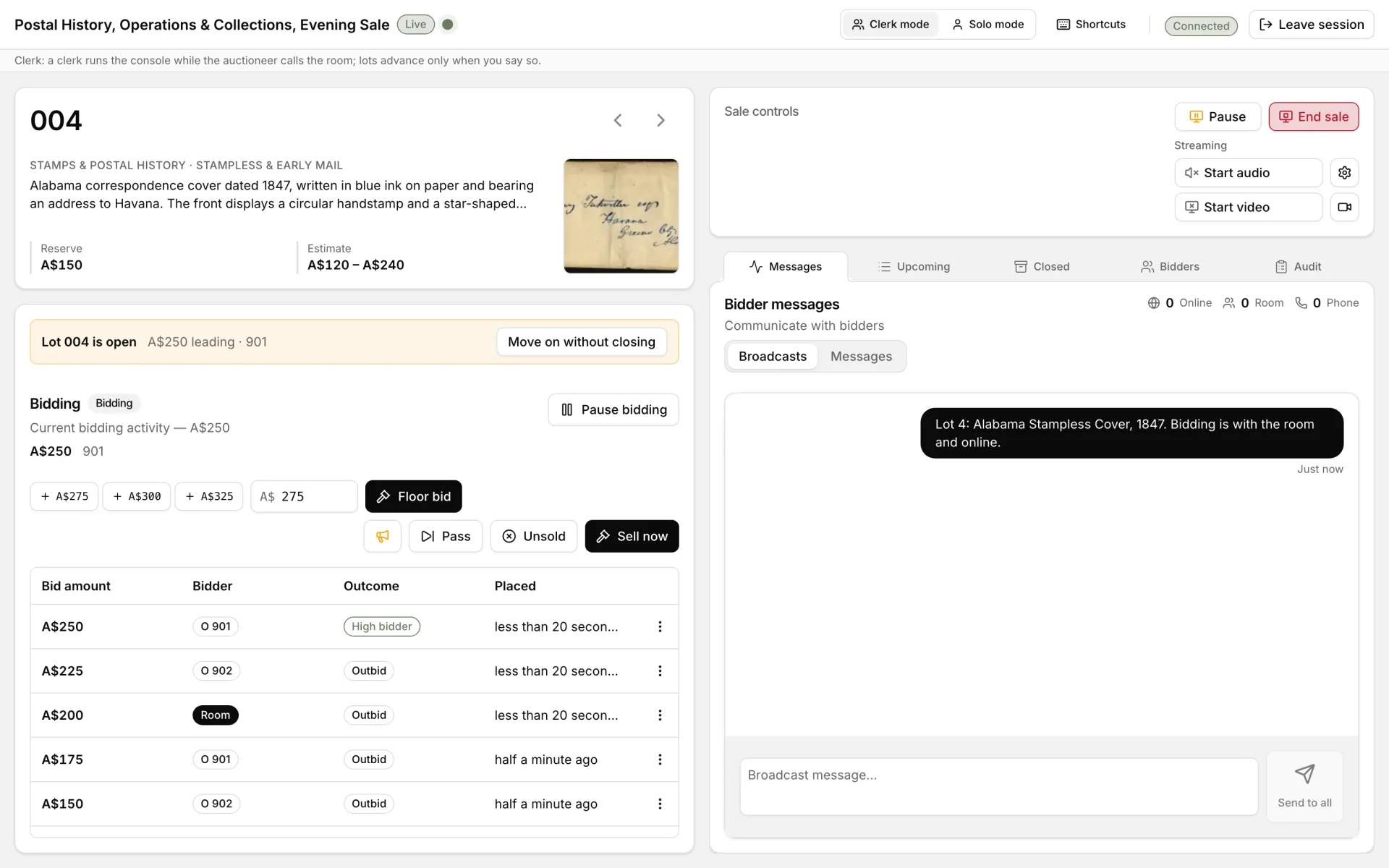
The live console during a sale at Kestrel Bay Stamp Auctions: the lot, the bids, floor bids and the stream. Demonstration house.
Lots and consignments
From a consignor's request to a catalogued lot.
Catalogue each lot
Estimates, reserve, starting bid, condition, provenance and a details table you label yourself.
Photographs in order
Up to twenty photographs a lot, dragged into the order bidders see them.
Spreadsheets in and out
Import lots from a CSV file and download a sale's lots as one. Publish, cancel or delete many lots at once.
Your categories
A category tree of your own, shown to bidders as catalogue filters.
Consignment requests
Review each request with its photographs and a suggested title, then approve it at your commission, decline it, or ask the consignor for more.
Into a sale, and settled
Assign an approved request to a sale and it becomes a lot with its photographs. Record what it sold for, your commission and the net due.
Sales
Set a sale up once and it runs to its own timetable.
Timed, live or Dutch
Choose the format, the dates and the currency for each sale, or start from a copy of an earlier one.
Checked before it goes public
A sale cannot be published without its dates and details, and you can preview it as bidders will see it.
Timed sales that run themselves
A timed sale opens and closes on schedule, extending a lot when a late bid arrives.
Results
Every lot's hammer price and buyer in one table, a PDF of the results, and unsold lots relisted in a later sale.
On the rostrum
One console for the auctioneer and the clerk, with the room and online bidders on the same lot.
Call the lot
Fair warning and last call, then sell, pass or mark the lot unsold, with an undo.
Floor bids
Enter a bid from the room at the next increment or any amount, and give the lot to the right buyer.
Commission bids
Enter absentee bids by hand or from a spreadsheet, and the console bids for each up to its limit.
Your camera and microphone
Stream the rostrum to online bidders from the dashboard, as video or audio alone.
Auctioneer and clerk together
A clerk can run the console while the auctioneer calls the room, and only one person runs the console at a time.
Bidders and customers
You decide who bids, and keep every customer's history in one record.
Approval for each sale
Approve, decline with a reason, or block a bidder. Each approved bidder is given a paddle number, and first-time bidders are marked.
Customer records
Each customer's sales, bids, invoices, consignments and your notes, and customers imported from a spreadsheet.
Messages
Write to one bidder or to everyone in a sale, with their replies in one inbox.
Privacy requests
Export or erase a customer's records when they ask.
Invoices and payment
Invoices go out with your terms, and buyers pay your house directly.
Invoices from the result
Raised for one lot or a whole sale, with your buyer's premium and tax, and sent by email with a PDF.
Followed up
Overdue invoices are flagged each day. Void an invoice and bill the lots again when something changes.
Bank transfer
Your bank details on every unpaid invoice, and a button to mark it paid when the money arrives.
Card, through your own Stripe account
Connect your house's Stripe account and buyers pay by card, straight to you. Auctionomy never holds the money.
Your terms
Your increment table, buyer's premium and tax rules, set once for the house.
Your website, edited here
Change what bidders see without asking anyone.
Your look
Your logo, colours and typefaces across the whole site.
Homepage and menus
Build the homepage from a library of sections, and set the menus and wording around the site.
Pages and specialists
Write and publish your own pages, and introduce your specialists by department.
How the catalogue looks
Choose how sales and lots are laid out for bidders.
Every version kept
A history of the site's earlier versions, any of which can be restored.
Your team and your house
Who can do what, how your sales are going, and what was changed.
Your team
Invite staff as an administrator or a read-only member. The owner alone handles billing, payment details and the domain.
How your sales are going
Revenue, bidders and lots sold over seven, thirty or ninety days, or all time, each chart downloadable as a spreadsheet.
A record of every change
An audit log of who did what, for the whole house and for each sale.
Notified as it happens
New registrations, payments, enquiries and the end of a sale, by email or in the dashboard, as each person prefers.
House settings
Your currency, time zone and the details printed on your invoices.
Set up, and helped along
A setup guide for your details, logo and colours on the first day, and help pages for your staff in the dashboard.

See it on your own catalogue
Send us a recent sale and we will show you both halves running it, under your own name.